WordPress is a feature-rich platform that provides you so many features. One such feature is the caption for featured images. There can be situations when you don’t find any options to add captions. What will you do in such cases? This article will teach you to add captions for featured images. So be here till the end.
What is a caption?
The simple answer to this question is the image information that you want to show to the user. In WordPress, you cannot edit the featured image on the post edit page. Whereas for other photos, you can add links just like adding them to text.
Why is it Essential to add a Caption to WordPress Featured Image?
At this moment, you know, a caption is a piece of information about an image. And it is essential to give credit to the image you are using. In case the image caption feature is absent, how will you give credit to the site? In addition, how will you provide information to the end user? You need to add support to your current theme.
Read, Developer Options Android – Everything You Need to Know
Show Caption Under WordPress Featured Image From Dashboard
This method is straightforward. But it works only if your current theme supports this feature. Fortunately, most themes support this feature. With that said, let us understand how you can add captions to your featured image. When you add a featured image from media in WordPress, you get the option to edit image information. From here, you can edit or add image information such as title, caption, and description.
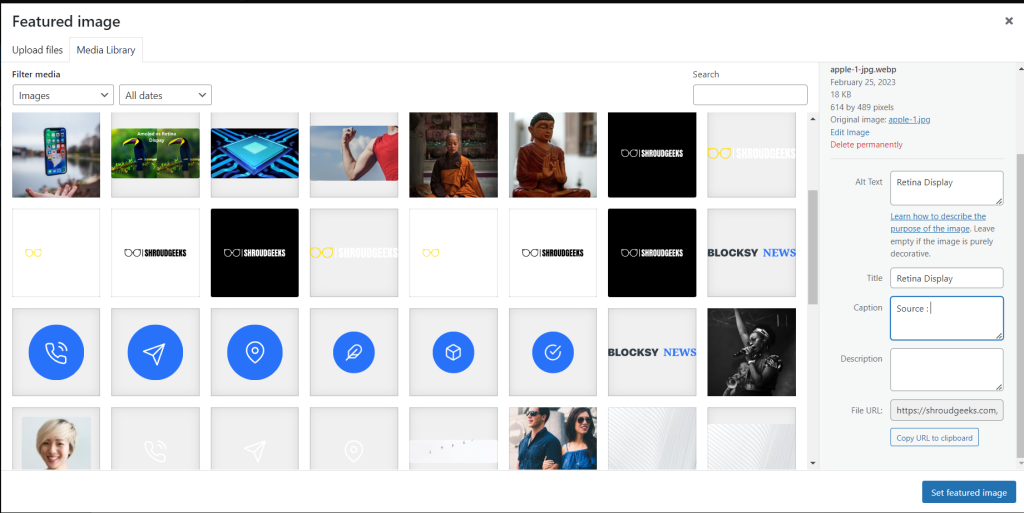
But the problem is when you set your featured image. It will only show the image on the screen. Talking about showing the picture, it depends on the theme you are using. In case your theme doesn’t support it, it will not how. However, I will cover the solution for not supporting themes also.
What if Your Theme Doesn’t Support it?
If your current theme doesn’t support featured image captions, you need to add them. For this, you need to figure out the file, which is the file containing the feature image. Once you find that file, you need to add the below-given code. It will add the needed support. If you liked this guide you may also like our guide Intel Vs. AMD. With that said, we have completed the guide.
<?php if (get_post(get_post_thumbnail_id())->post_excerpt) { // search for if the image has caption added on it ?>
    <span class="featured-image-caption">
        <?php echo wp_kses_post(get_post(get_post_thumbnail_id())->post_excerpt); // displays the image caption ?>
    </span>
<?php } ?>