Struggling to sleep because your earbuds dig into your ears when you roll onto your side? The Soundcore Sleep A20 is specifically designed to fix that problem.
These earbuds are built for one purpose: helping you sleep comfortably through the night. Unlike regular earbuds that stick out and hurt when you lie down, the Sleep A20 sits flush against your ear—almost like it’s not even there.
If you’re someone who needs earbuds that actually work while sleeping, this review covers everything you need to know.
What Makes the Sleep A20 Different?
The biggest difference from other earbuds is the design. They’re incredibly small and flat. The earbuds don’t protrude like normal earbuds, so they don’t dig into your ear when you sleep on your side.
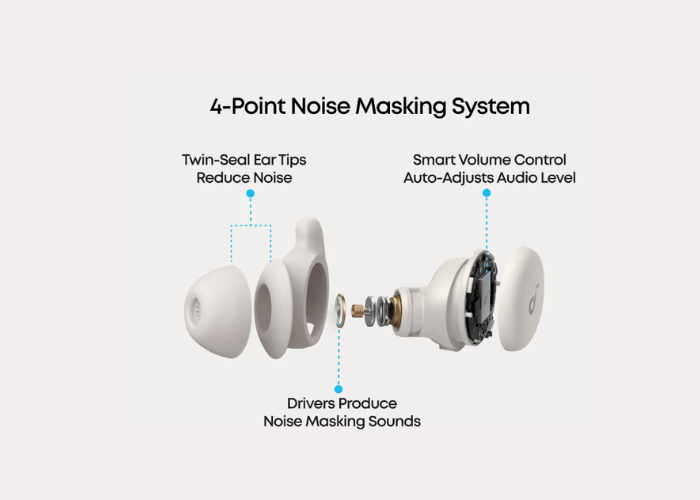
You get seven different ear tip sizes and three different ear wing sizes in the box. This means you can customize the fit until it feels perfect. The ear tips are soft and flexible, which means zero pressure on your ear canal even if you wear them for 8+ hours straight.
The goal is simple: comfort during sleep. Everything else is secondary.
Audio Quality: Good Enough for Sleep (and More)
The Sleep A20 doesn’t have Active Noise Cancellation (ANC), but it does have something called a four-point noise masking system. This combines the physical design for noise blocking with a library of soothing sounds—white noise, rain, nature sounds—to drown out distractions like snoring partners or street noise.
Sound quality:
- The audio is crisp and clear, good enough for music and podcasts
- You can customize the sound using the Soundcore app
- They’re not as bass-heavy as larger earbuds, but that’s fine for sleep
- Bluetooth 5.3 means a stable, lag-free connection
These aren’t made for pumped-up music at the gym. They’re made to be gentle on your ears while you sleep.
Battery Life: Impressively Long
This is where the Sleep A20 really shines. On a single charge in sleep mode, you get up to 14 hours. That’s nearly two full nights of sleep.
With the charging case, you get 80 hours total—over a week of sleep without needing to recharge.
Even if you use them for regular Bluetooth streaming (music, podcasts), you still get around 10 hours per charge.
For a side sleeper or traveler, this battery life is a game-changer.
Smart Features Worth Using
The Soundcore app is where these earbuds shine. Key features:
Smart Sleep Detection — The earbuds automatically detect when you’ve fallen asleep, stop your music/podcast, and switch to soothing sleep sounds. You don’t have to do anything.
Sleep Analytics — The app tracks your sleep patterns and shows you data about how well you slept. It’s not clinical data like a smartwatch, but it gives you insights into your sleep habits.
Silent Alarms — Set alarms that only you can hear through the earbuds. Perfect for not waking up your partner.
Custom Sound Library — White noise, rain, thunderstorms, forest ambience—the app has dozens of soothing sounds to choose from.
Sleep A20 vs. Other Sleep Earbuds
| Feature | Sleep A20 | Sleep A10 | Regular Earbuds |
|---|---|---|---|
| Design for sleeping | Yes, ultra-flat | Yes, but an older design | No, uncomfortable |
| Battery (sleep mode) | 14 hours per charge | Lower | N/A |
| Total battery (with case) | 80 hours | Less | Less |
| Noise masking | Yes, 4-point system | Yes | No |
| Microphone for calls | No | No | Yes |
| ANC | No | No | Yes (some) |
| Price | ~$149 | Cheaper | Varies |
The Sleep A20 is better than the older Sleep A10 in almost every way. Compared to regular earbuds, there’s no competition if your main use is sleeping.
What the Sleep A20 Can’t Do
These earbuds have limitations. Understanding them helps you decide if they’re right for you.
No microphone — You can’t make phone calls with these. They’re sleep earbuds, not calling earbuds.
No water resistance rating — They’re not officially rated for water resistance. Don’t use them in the shower or while swimming.
No wireless charging — You have to charge the case with a USB cable.
Can’t play music and sleep sounds together — You can play music OR sleep sounds, but not both at the same time.
Not for active use — These aren’t for the gym, running, or sports. They’re too minimalist for that.
Who Should Buy the Soundcore Sleep A20?
Good for:
- Side sleepers who need earbuds that don’t hurt
- People who travel frequently and need a long battery life
- Anyone who needs to sleep with earbuds but wants comfort
- People who want to block out snoring partners or street noise
- Those who want sleep tracking data
Not for:
- People who need to make phone calls
- Athletes or gym-goers
- People who want waterproof earbuds
- Anyone who needs ANC
Final Verdict: Worth It?
At $149, the Soundcore Sleep A20 is a niche product. It’s not for everyone. But if you’re someone who actually sleeps with earbuds, it’s one of the best options available.
The ultra-flat design actually works. The battery life is excellent. The app is useful. And most importantly, they don’t hurt your ears after 8+ hours of wear.
If you’ve been struggling to find earbuds that work for sleeping, these are worth trying. If you only wear earbuds occasionally or for other activities, save your money.
The Sleep A20 does one thing really well: help you sleep comfortably. If that’s what you need, buy them.